

Every few weeks, we ship updates based on what our care teams are actually running into. This release focuses on three areas: faster RPM documentation, more visibility into time tracking, and a table customization system that sticks.
Here is a walkthrough of what changed and what it means for your day-to-day work.
Smarter RPM Activity Logging
The most significant update in this release is to the Log Activity Time workflow, previously called Log Time.
When you launch it from the Readings page, the platform now does two things automatically: it selects the device you were reviewing from your active tab, and it generates an AI summary based on that patient’s readings data.
The summary is a starting point, not a finished note. Before you can submit, you are required to add your own. That requirement is intentional. It ensures documentation complies with best practices in healthcare and follows rules and regulations.
Cumulative time tracking is also new inside this window. You can now see the total monthly time logged for a patient’s program, such as RPM, directly as you document. Previously, that required navigating away or cross-referencing separately. Now it is visible in context.
Finally, there is a new optional rating field so you can tell us how useful the AI summary was. That feedback will be used to improve the models over time.
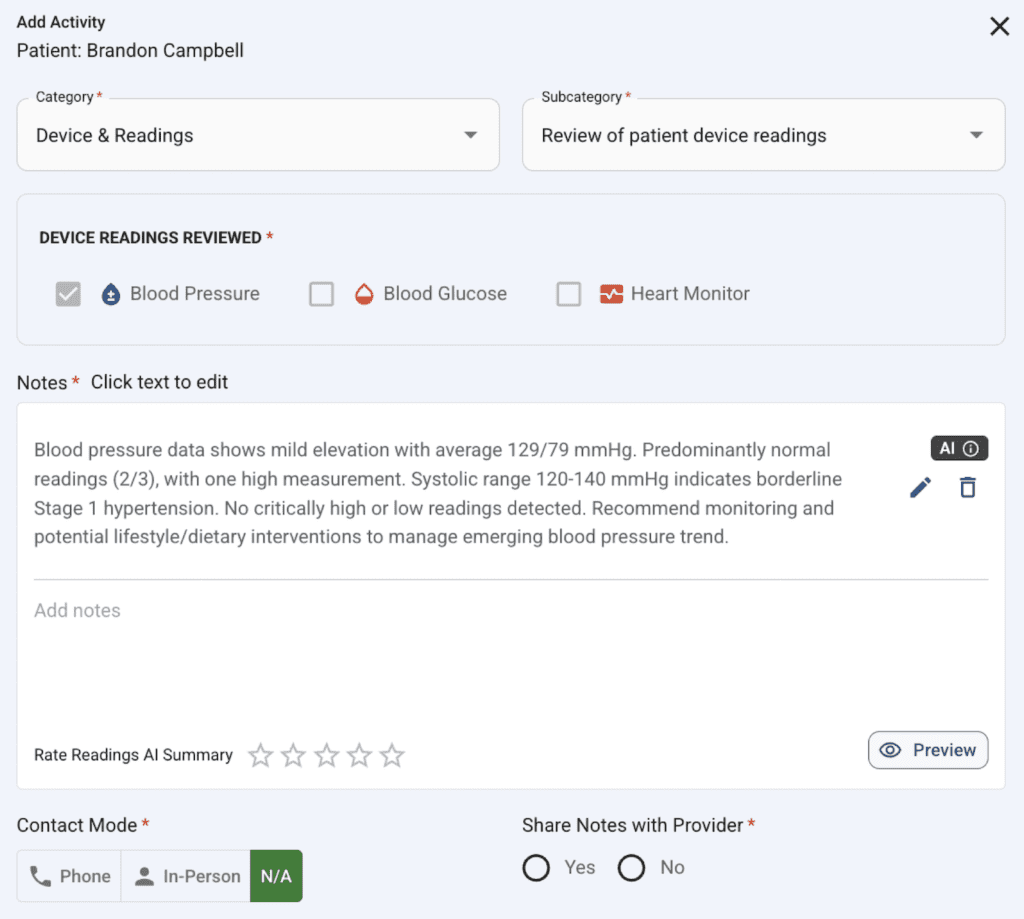
AI summary example of patient device readings applied to aid documentation
Your Table Layouts Now Save!
Across the platform, you can customize the data tables to match how your team works. You can reveal additional columns, hide fields you do not use, and drag columns into your preferred order.
That layout now saves to your account. The next time you log in or return to the page, it will be exactly as you left it.
One intentional exception: sort order does not save.
Every page load returns to the default sort, which keeps critical alerts and time-sensitive events at the top of your list. Column visibility and order persist. Sorting resets by design.
Quality of Life Updates and Bug Fixes
A handful of smaller improvements shipped in this release including bug fixes and improved goal creation interface for provider workflows.
That is the June 9 release. As always, if something is not working as expected or you have feedback, contact our support team.
Tags: product updates